 GearBear
Appointments, cars and service history for your garage Pieraksti, automašīnas un servisa vēsture jūsu autoservisam
A free Windows app for car garages. Book work in the calendar, fill in job cards, print them for the customer, and find any car's history in a second. It works offline and keeps your data on your own PC. Bezmaksas Windows programma autoservisiem. Pierakstiet darbus kalendārā, aizpildiet darba kartes, izdrukājiet tās klientam un atrodiet jebkuras automašīnas vēsturi sekundes laikā. Darbojas bez interneta, un dati paliek jūsu datorā.
Formerly called GarageManager. Already using it? Click Download in the app's “new version” bar and run the installer: it replaces GarageManager with GearBear and keeps all your data.Agrāk saucās GarageManager. Jau lietojat? Spiediet Lejupielādēt programmas joslā “jauna versija” un palaidiet instalētāju: tas aizstās GarageManager ar GearBear un saglabās visus datus.
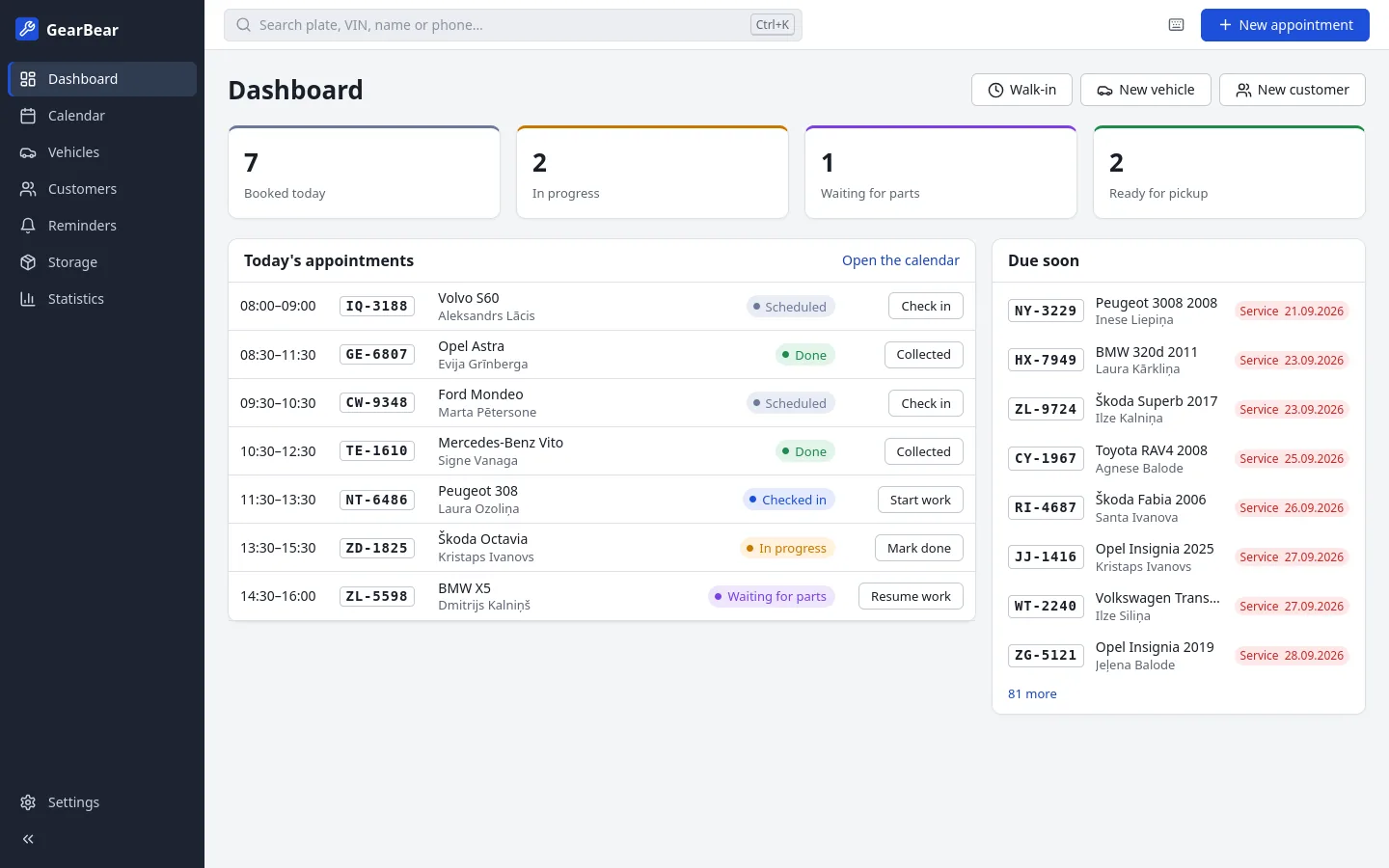
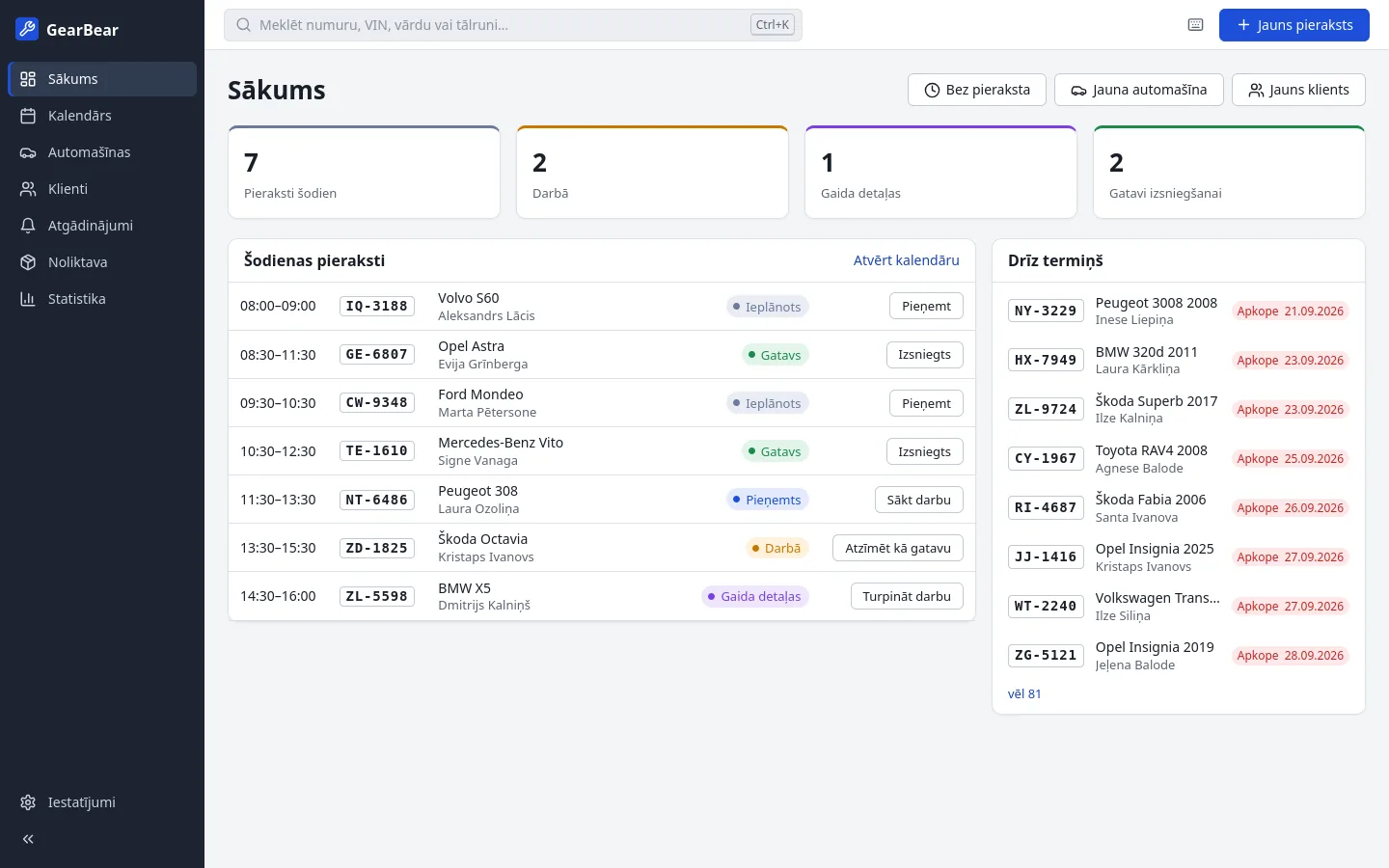
Everything the front desk needs, nothing it doesn'tViss, kas vajadzīgs reģistratūrai, un nekā lieka
Made together with a working garage, for receptionists and mechanics who use it all day.Veidota kopā ar strādājošu autoservisu, reģistratoriem un mehāniķiem, kas to lieto visu dienu.
CalendarKalendārs
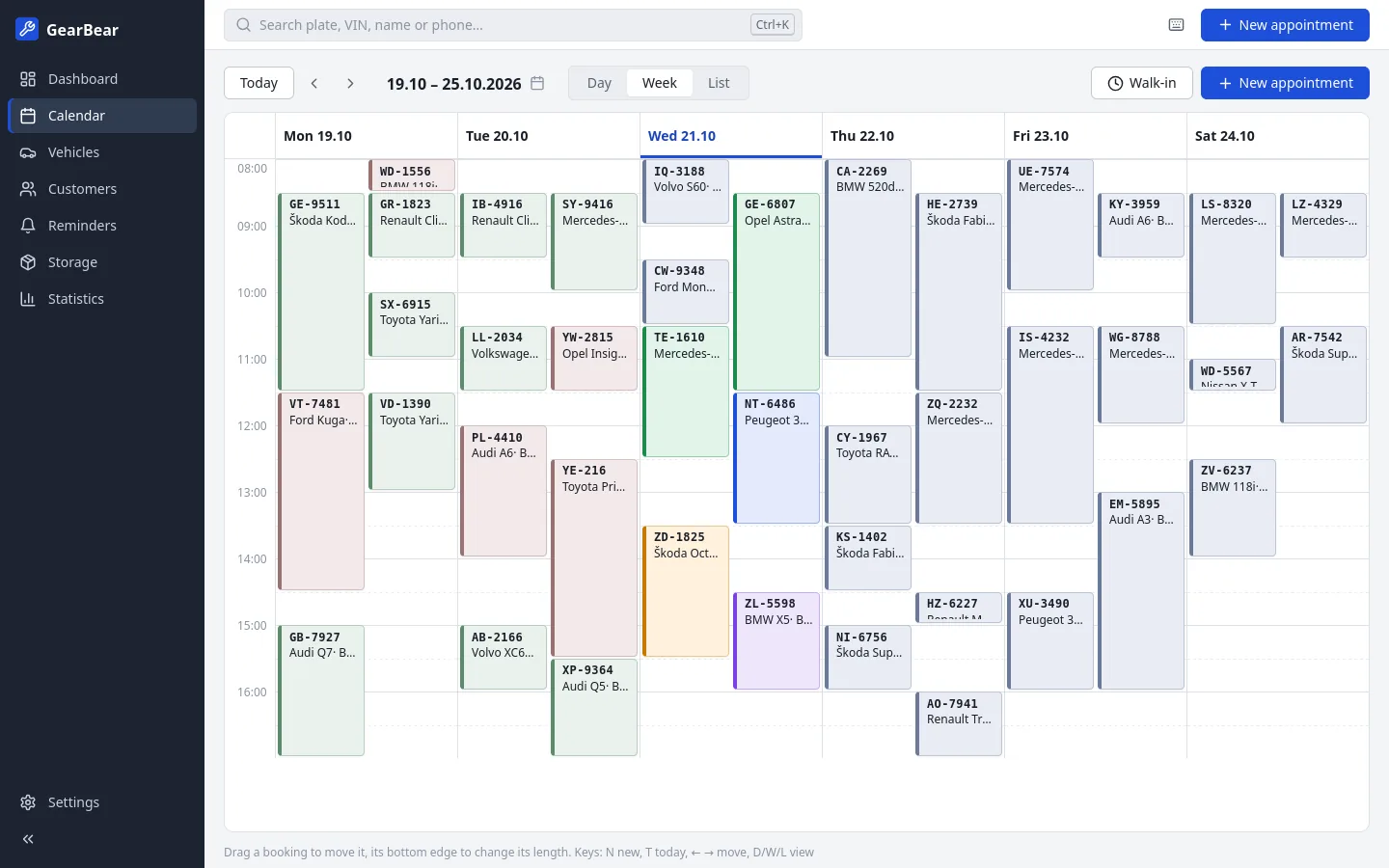
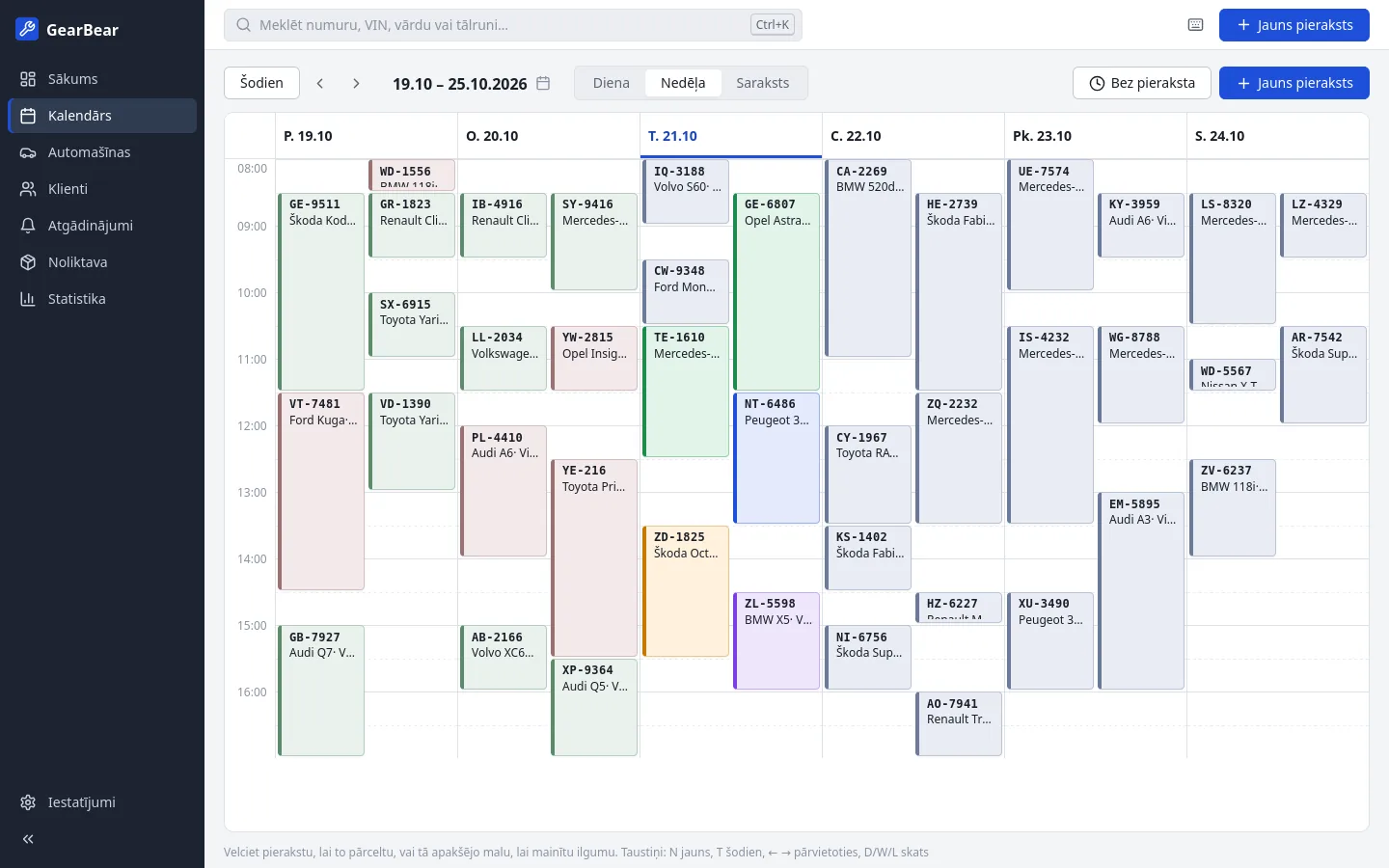
Day and week views per bay and mechanic. Drag a booking to move it. Clear colours show what's booked, in progress, waiting for parts or ready.Dienas un nedēļas skats pa remonta vietām un mehāniķiem. Pārvelciet pierakstu, lai to pārceltu. Skaidras krāsas rāda, kas ir pierakstīts, procesā, gaida detaļas vai ir gatavs.
Job cardsDarba kartes
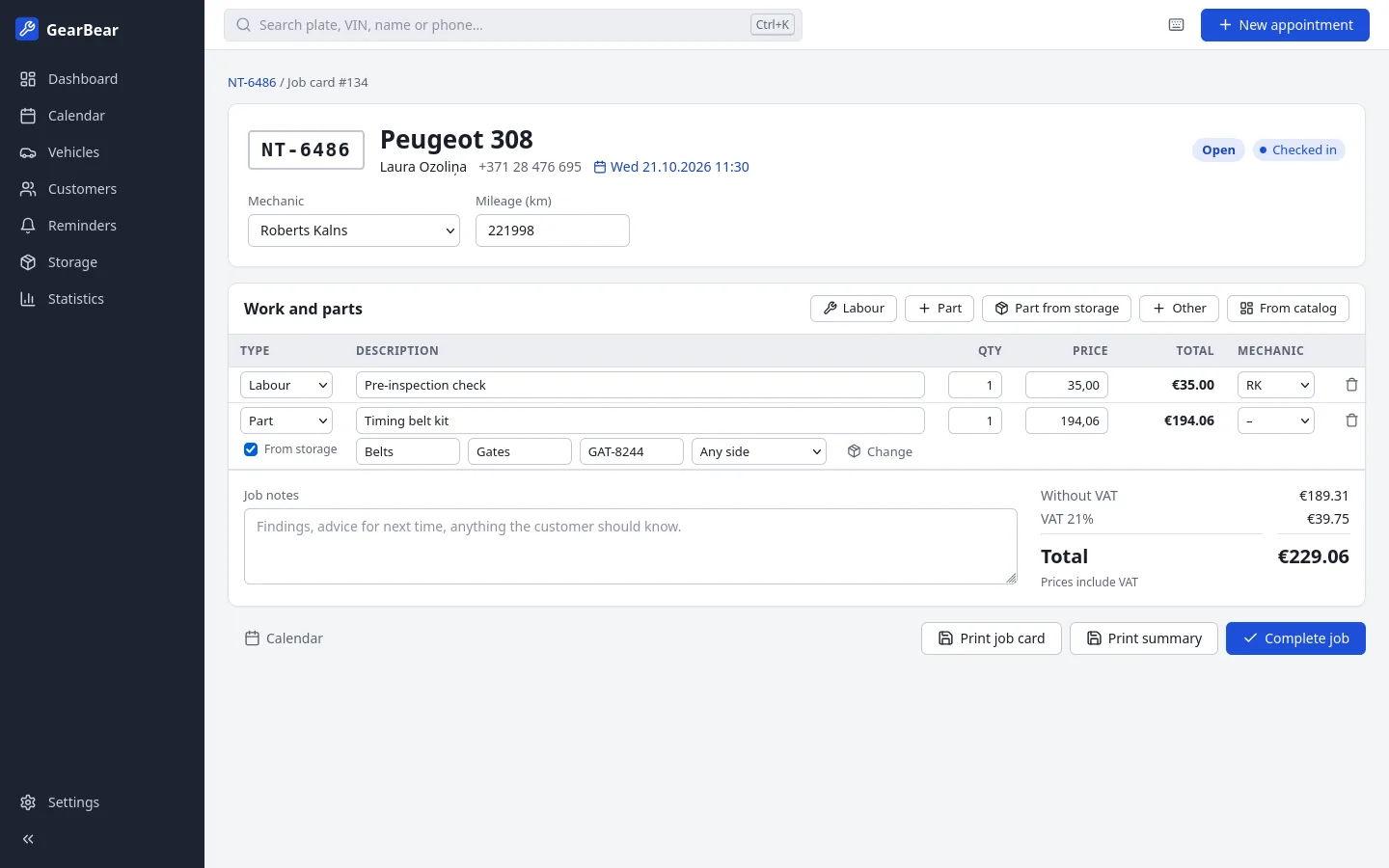
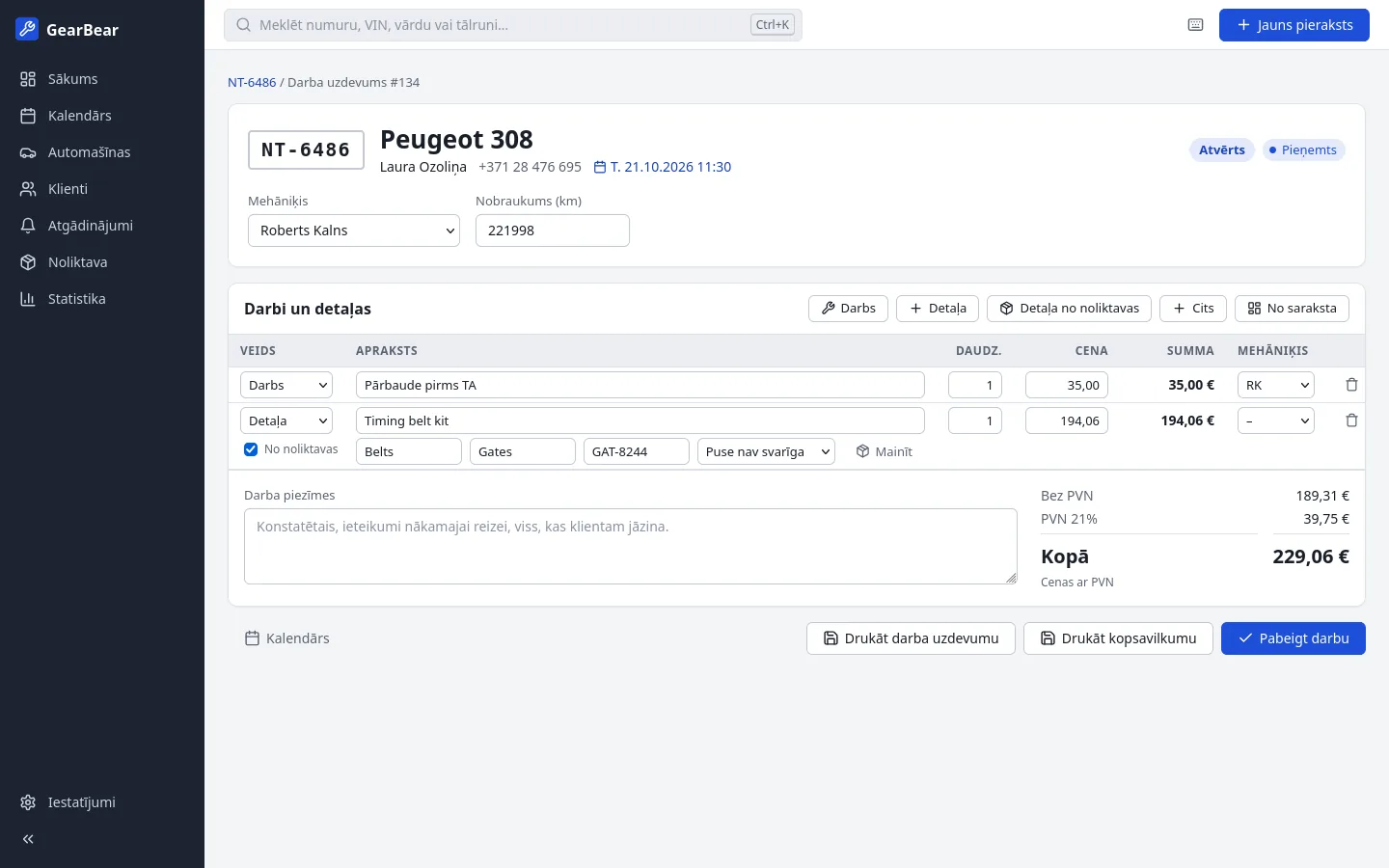
Labour, parts and other costs with VAT worked out for you. Print a job card for the workshop and a summary for the customer.Darbs, detaļas un citas izmaksas ar automātiski aprēķinātu PVN. Izdrukājiet darba karti darbnīcai un kopsavilkumu klientam.
Instant searchTūlītēja meklēšana
Type part of a plate, VIN, name or phone number and the car is there, even with 100 000 vehicles. Ctrl+K from anywhere.Ierakstiet daļu no numura, VIN, vārda vai tālruņa, un automašīna ir atrasta, pat ja to ir 100 000. Ctrl+K no jebkuras vietas.
History and remindersVēsture un atgādinājumi
Every job on every car, with mileage. See which cars are due for a service by date or kilometres, and mark who you've called.Katrs darbs katrai automašīnai, ar nobraukumu. Redziet, kurām automašīnām pienācis servisa laiks pēc datuma vai kilometriem, un atzīmējiet, kam jau zvanījāt.
Parts storageDetaļu noliktava
Keep track of the parts and fluids on your shelves. Take them straight onto a job card and the stock updates itself.Uzskaitiet detaļas un šķidrumus plauktos. Ņemiet tās uzreiz darba kartē, un atlikums mainās pats.
StatisticsStatistika
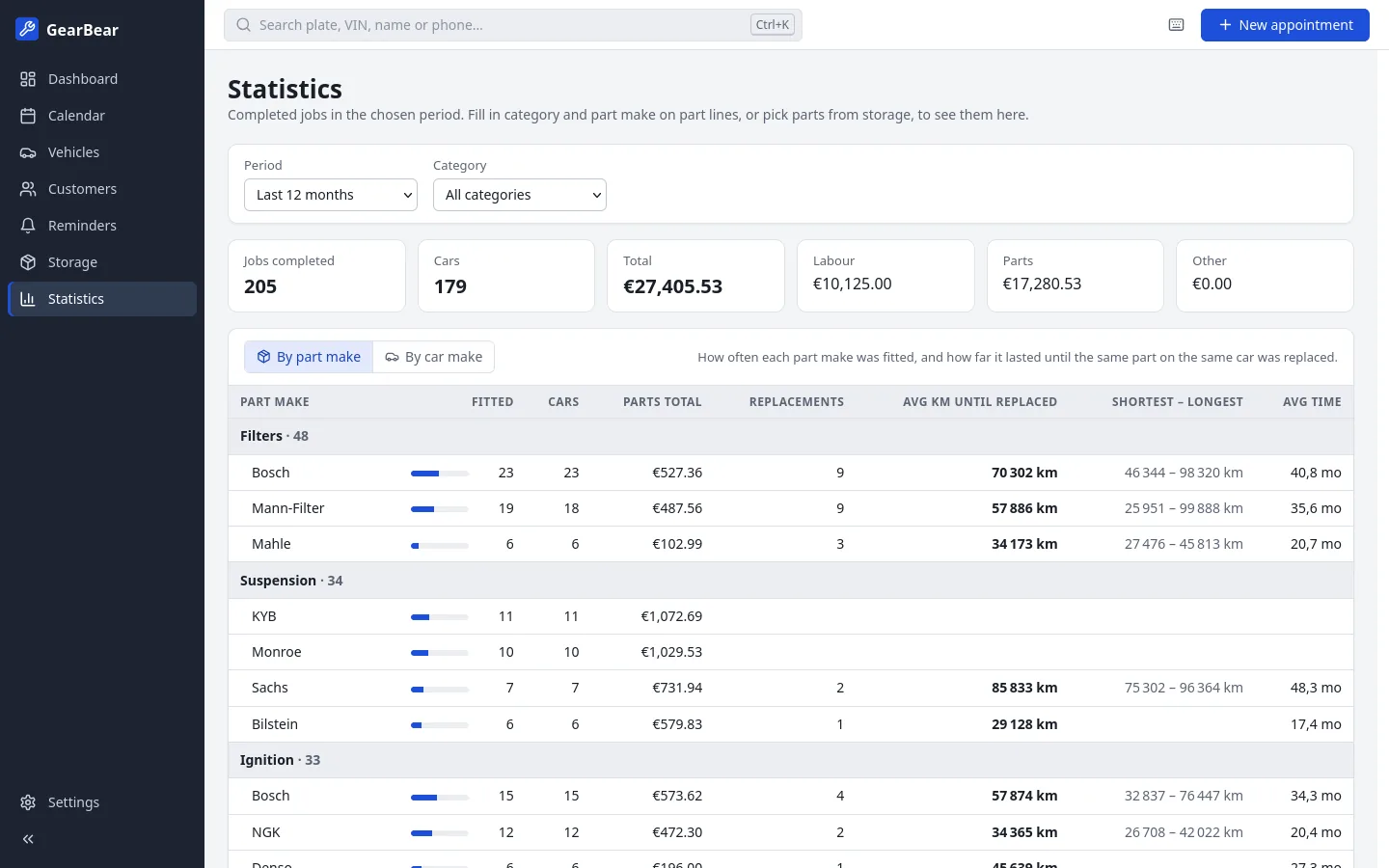
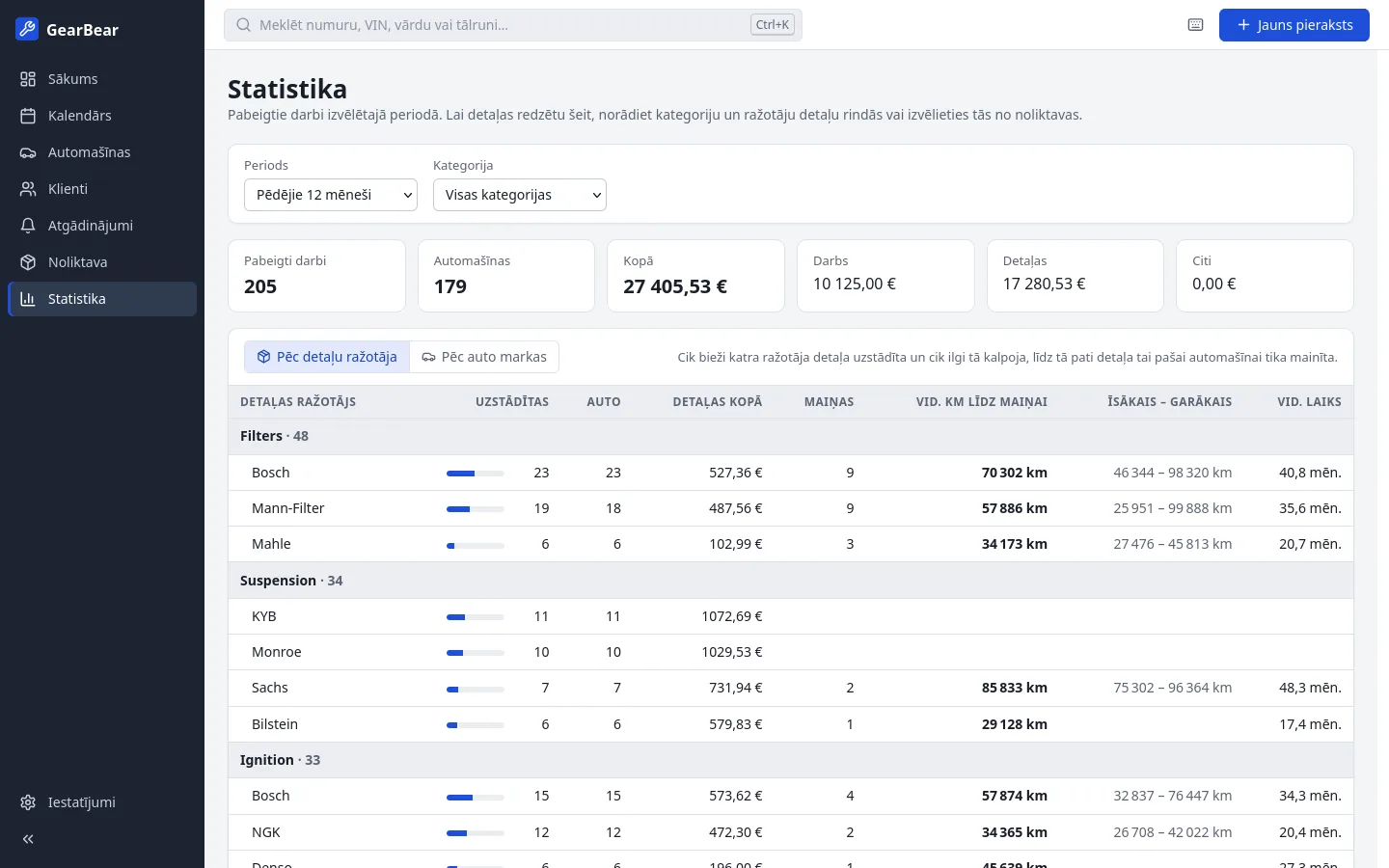
Jobs, turnover, labour and parts for any period. See which part makes last longest, in kilometres, on real cars.Darbi, apgrozījums, darbs un detaļas jebkuram periodam. Redziet, kuru ražotāju detaļas kalpo visilgāk, kilometros, uz īstām automašīnām.
Daily backupsIkdienas rezerves kopijas
Backs itself up every day, to another drive if you like. A power cut can't damage the data. Restoring takes two clicks.Katru dienu pati izveido rezerves kopiju, ja vēlaties, uz citu disku. Elektrības pārtraukums datus nesabojā. Atjaunošana prasa divus klikšķus.
Private and offlinePrivāti un bez interneta
No account, no cloud, no monthly fee. Your customers' data never leaves your computer. It runs well on old laptops too.Bez konta, bez mākoņa, bez ikmēneša maksas. Jūsu klientu dati nekad neatstāj jūsu datoru. Labi darbojas arī uz veciem klēpjdatoriem.
A look insideIeskats programmā
Light and dark, following your Windows setting. Screenshots show made-up sample data.Gaišā un tumšā tēma atbilstoši Windows iestatījumam. Ekrānuzņēmumos redzami izdomāti paraugdati.
Download and installLejupielāde un uzstādīšana
For Windows 10 and 11 (64-bit). The installer takes about a minute.Windows 10 un 11 (64 bitu). Uzstādīšana aizņem apmēram minūti.
-
Download the installerLejupielādējiet instalētāju
Click the button above. The file is called GearBear-Setup.exe.Spiediet pogu augstāk. Faila nosaukums ir GearBear-Setup.exe.
-
Allow it to runAtļaujiet to palaist
Windows may show a blue “Windows protected your PC” window. Click More info, then Run anyway.Windows var parādīt zilu logu “Windows aizsargāja jūsu datoru”. Spiediet Vairāk informācijas un tad Tik un tā palaist.
Why?Kāpēc? Windows shows this for programs from small publishers without a paid code-signing certificate. It is not a sign of a virus, and it only appears the first time.Windows to rāda programmām no maziem izstrādātājiem bez maksas koda paraksta sertifikāta. Tā nav vīrusa pazīme, un tas parādās tikai pirmo reizi.
-
InstallUzstādiet
Click Next and Install. You get a shortcut on the desktop and in the Start menu. If the PC lacks Microsoft WebView2, the installer adds it.Spiediet Tālāk un Uzstādīt. Uz darbvirsmas un izvēlnē Sākt parādīsies saīsne. Ja datorā nav Microsoft WebView2, instalētājs to pievienos.
-
Set it upIestatiet
Open Settings: enter your garage name and details for printouts, opening hours, VAT, mechanics and bays. Choose a backup folder on another drive. Then book your first appointment.Atveriet Iestatījumus: ievadiet servisa nosaukumu un rekvizītus izdrukām, darba laiku, PVN, mehāniķus un remonta vietas. Izvēlieties rezerves kopiju mapi uz cita diska. Tad pierakstiet pirmo klientu.
UpdatesAtjauninājumi
When a new version is out, a bar appears at the top of the app. Click Download, close GearBear and run the new installer. All your data stays.Kad iznāk jauna versija, programmas augšā parādās josla. Spiediet Lejupielādēt, aizveriet GearBear un palaidiet jauno instalētāju. Visi dati saglabājas.
Already have customers in Excel?Klienti jau ir Excel tabulā?
Save the sheet as CSV and import it in Settings → Import. You choose which column is which.Saglabājiet tabulu kā CSV un importējiet to sadaļā Iestatījumi → Imports. Jūs norādāt, kura kolonna ir kura.
RequirementsPrasības
- Windows 10 or 11, 64-bitWindows 10 vai 11, 64 bitu
- Any PC from the last ten years; uses well under 100 MB of memoryJebkurš pēdējo desmit gadu dators; aizņem krietni mazāk par 100 MB atmiņas
- Internet only for installing and for update checksInternets vajadzīgs tikai uzstādīšanai un atjauninājumu pārbaudei
Support GearBearAtbalstiet GearBear
GearBear is free, with no ads and no subscriptions. If it saves your garage time, a small donation helps keep it going: new features, fixes and updates. GearBear ir bez maksas, bez reklāmām un abonementiem. Ja tā ietaupa jūsu servisam laiku, neliels ziedojums palīdz to attīstīt: jaunas iespējas, labojumi un atjauninājumi.
DonateZiedotThe donation page is coming soon. Thank you for wanting to help!Ziedojumu lapa drīzumā būs pieejama. Paldies, ka vēlaties atbalstīt!
QuestionsJautājumi
Is it really free?Vai tiešām bez maksas?
Yes. Every feature, for as long as you use it. There's no trial and no locked features. Donations are welcome but never required.Jā. Visas iespējas, cik ilgi vien lietojat. Nav izmēģinājuma perioda un nav slēgtu funkciju. Ziedojumi ir laipni gaidīti, bet nekad nav obligāti.
Where is my data, and does anything get sent anywhere?Kur glabājas mani dati, un vai kaut kas tiek kaut kur sūtīts?
Everything is in one database file in %APPDATA%\GearBear on your PC, plus the backups. Settings → About shows the exact folder. The only internet use is a check for new versions: the app reads one small file from this website. No data about you, your garage or your customers is sent, and you can switch the check off in Settings.Viss glabājas vienā datubāzes failā mapē %APPDATA%\GearBear jūsu datorā, kopā ar rezerves kopijām. Precīzā mape redzama sadaļā Iestatījumi → Par programmu. Internets tiek izmantots tikai jaunu versiju pārbaudei: programma nolasa vienu mazu failu no šīs mājaslapas. Netiek sūtīti nekādi dati par jums, jūsu servisu vai klientiem, un pārbaudi var izslēgt iestatījumos.
Can several PCs share the same data?Vai vairāki datori var lietot tos pašus datus?
Not yet. GearBear runs on one PC, usually at the front desk. To move to a new PC, make a backup on the old one and restore it on the new one.Pagaidām ne. GearBear darbojas vienā datorā, parasti reģistratūrā. Lai pārietu uz jaunu datoru, izveidojiet rezerves kopiju vecajā un atjaunojiet to jaunajā.
Does it work on Mac or Linux?Vai tā darbojas uz Mac vai Linux?
No, only on Windows 10 and 11.Nē, tikai uz Windows 10 un 11.
What is the portable exe for?Kam paredzēts pārnēsājamais exe?
It's the same app without an installer. Put it in a folder such as C:\GearBear and run it. To keep the data in that folder too, for example on a USB stick, create an empty file named portable next to the exe before the first start.Tā ir tā pati programma bez instalētāja. Ielieciet to mapē, piemēram, C:\GearBear, un palaidiet. Lai arī dati glabātos šajā mapē, piemēram, USB zibatmiņā, pirms pirmās palaišanas blakus exe failam izveidojiet tukšu failu ar nosaukumu portable.
How do I uninstall it?Kā to noņemt?
Windows Settings → Apps → Installed apps → GearBear → Uninstall. Your database and backups are kept in case you change your mind. Delete the %APPDATA%\GearBear folder to remove them as well.Windows Iestatījumi → Programmas → Instalētās programmas → GearBear → Atinstalēt. Datubāze un rezerves kopijas tiek saglabātas, ja pārdomājat. Lai izdzēstu arī tās, izdzēsiet mapi %APPDATA%\GearBear.